
Build a Responsive Animated Portfolio Website with Dark & Light Mode
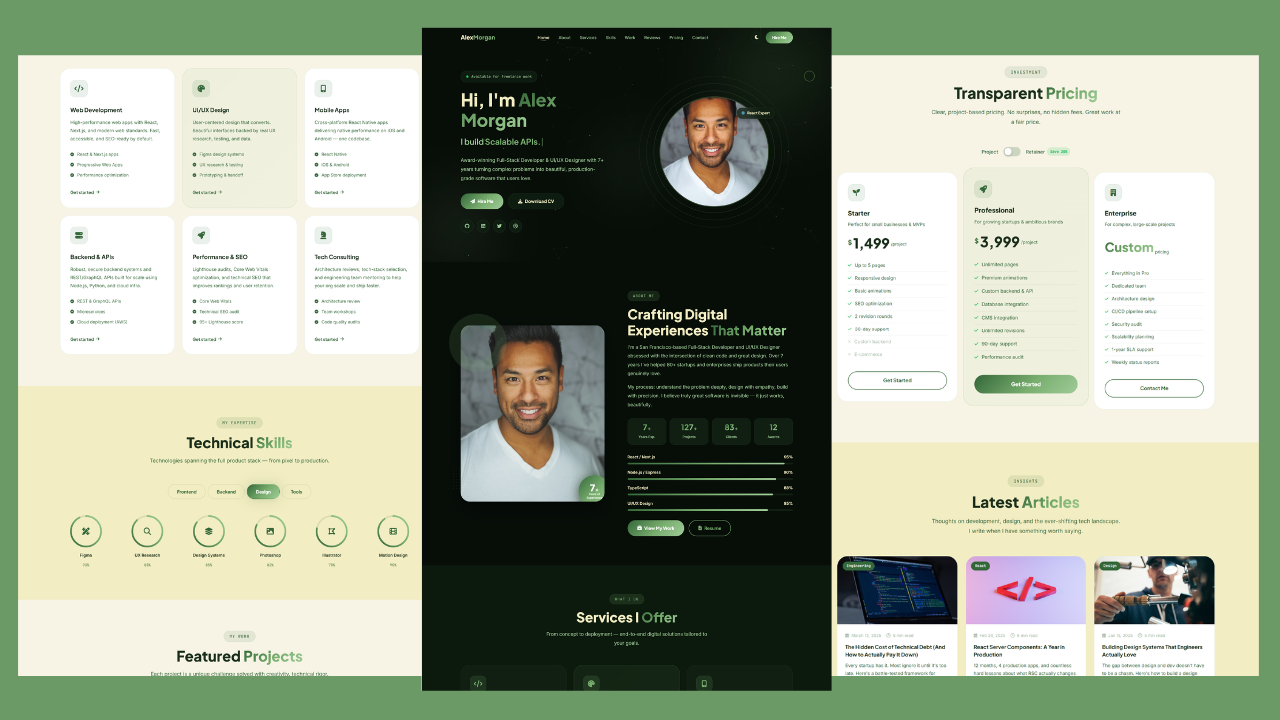
Your portfolio is no longer just a website. In 2026, it’s your handshake, your business card, and your first interview all rolled into one scrollable experience.
The standards have shifted dramatically. Recruiters spend seconds, not minutes, deciding whether you’re worth a callback. Clients judge your skill by how your portfolio website feels before they ever read a single word about you.
That’s why animated portfolio websites with dark and light mode have become the new baseline. Smooth transitions, responsive layouts, and theme toggles aren’t fancy extras anymore. They’re expected.
This guide walks you through a complete animated personal portfolio website template, built with modern web animations, full responsiveness, and a clean UI UX portfolio design. Whether you’re a developer hunting your next role, a freelancer chasing better clients, a designer showcasing creative work, or a student building your first personal brand, this project is made for you.
And yes, the portfolio website free source code is included.
Why Animated Portfolio Websites Matter
First impressions happen in under three seconds. That’s how long a visitor takes to decide whether to stay or bounce.
A static portfolio with plain text and flat images simply can’t compete anymore. Modern visitors expect motion, depth, and interactivity. They want to feel the personality behind the work.
Animated portfolio websites do something static ones can’t. They guide the eye, build emotional connection, and quietly demonstrate technical skill without saying a word. Every hover, every fade-in, every smooth scroll signals quality.
For freelancers especially, this matters for conversions. Clients aren’t just hiring a service. They’re hiring confidence. A polished interactive portfolio website tells them you understand modern UI/UX expectations and that you’ll bring that same care to their project.
Personal branding lives or dies on these details. The best portfolio websites in 2026 all share the same DNA: motion that serves purpose, design that respects the user, and content that loads fast on any device.
Overview of This Portfolio Project
This project is a fully responsive, animated personal portfolio website with a built-in dark and light mode toggle. It’s designed as a modern portfolio website with a clean aesthetic, sharp typography, and subtle motion that brings every section to life.
Think of it as a frontend portfolio template that’s ready to launch. The hero section greets visitors with movement. The sections flow seamlessly. The theme switcher lets users pick their preferred mood.
Every part of the layout has been crafted with intention. Spacing breathes. Animations feel deliberate, never gimmicky. The navigation stays sticky and accessible. The mobile experience matches the desktop one in polish.
This isn’t a generic template you’ll see on every other portfolio website. It’s built to feel premium out of the box, with room to make it entirely your own.
Key Features Breakdown
Dark & Light Mode Toggle
The theme toggle website feature lets visitors switch between dark and light modes with a single click. Dark mode reduces eye strain in low light environments. Light mode keeps things crisp and professional during the day.
This isn’t just a trend. It’s an accessibility feature that respects user preference and improves overall experience.
Fully Responsive Design
The portfolio adapts smoothly to every screen size. Phones, tablets, laptops, ultra-wide monitors. Everything realigns, resizes, and reflows perfectly.
This mobile-friendly portfolio website uses flexible layouts that prioritize readability and touch-friendly interactions on smaller devices.
Smooth Scrolling Experience
A smooth scrolling website feels noticeably different from a standard one. The page glides instead of jumping, creating a calm, premium rhythm as visitors explore each section.
It’s a small detail with a big impact on perceived quality.
Animated Sections and Transitions
Every section reveals itself with purpose. Elements fade, slide, and lift into view as users scroll. These modern web animations add depth without ever slowing the experience down.
Performance was a priority. Motion enhances the design instead of competing with it.
Hero Section with Modern UI
The hero is your opening statement. This portfolio landing page hero combines bold typography, a clear introduction, and a strong call to action.
Animations in the hero immediately signal that this is no ordinary portfolio.
About Section for Personal Branding
Your about section is where personality lives. The layout here is built for storytelling, with space for a professional photo, a personal narrative, and key details that build trust.
This is your personal branding website moment. Make it count.
Skills Showcase Layout
Skills get a dedicated, visually organized section. Whether you list frameworks, design tools, or soft skills, the layout makes them easy to scan and remember.
It’s clean, structured, and built to impress technical reviewers.
Services Section
Freelancers will love this. The services section highlights what you offer in a way that converts curious visitors into paying clients.
Each service card is structured for clarity and benefit-driven messaging.
Portfolio Projects Showcase
This is the heart of any portfolio. The projects grid showcases your work with hover interactions, clean thumbnails, and space for project descriptions and links.
It’s the kind of creative portfolio layout that holds attention.
Testimonials Section
Social proof closes deals. The testimonials section presents client or colleague feedback in a clean, trustworthy format.
It builds credibility without feeling salesy.
Contact Section with Clean UI
A working contact section is non-negotiable. This one is straightforward, friendly, and built to convert visitors into conversations.
Form fields are accessible, the layout is uncluttered, and the call to action is clear.
Sticky Navigation Menu
The navigation stays with users as they scroll. No hunting for links, no scrolling back to the top. Just smooth access to any section, anytime.
Mobile-Friendly Navigation
On mobile, the menu transforms into a clean hamburger-style toggle. It expands smoothly, fits the screen perfectly, and feels native to touch.
Modern UI/UX Design Principles
Every choice in this portfolio follows current UI/UX standards. Generous whitespace, clear hierarchy, readable type, and consistent spacing throughout.
It’s the difference between a portfolio that looks made and one that looks designed.
Check Out Those Useful Articles
Dark & Light Mode Benefits
Dark and light mode isn’t just visual flair. It’s user empowerment.
Some people read better in dark environments. Others find light mode easier on their eyes during the day. Giving users that choice signals that you care about their comfort.
There’s also an accessibility angle. People with certain visual sensitivities genuinely need theme options. Including them makes your portfolio website more inclusive by default.
From a design trend perspective, theme toggles have become a hallmark of modern portfolio website design. Sites that lack them often feel dated within months of launch.
Responsive Design Advantages
Most portfolio traffic now comes from mobile devices. A responsive portfolio website ensures that experience never feels like a downgrade.
The mobile-first approach this template follows means every element is designed to work beautifully on small screens first, then scaled up. Text remains readable. Buttons stay tappable. Images load fast and look crisp.
Flexible layouts mean the design holds up whether someone views it on a five-inch phone or a thirty-inch monitor. Nothing breaks. Nothing overflows. Everything just works.
For SEO, this matters even more. Google rewards mobile-friendly portfolio websites with better rankings.
Animation & Interaction Experience
Good animation is invisible until you notice how much you enjoy it. This portfolio’s animations are tuned for that exact feel.
Hover effects respond gently when users interact with buttons, cards, and links. They confirm action without screaming for attention.
Scroll animations bring sections to life as users move through the page. Each reveal feels timed, never overwhelming.
Micro-interactions add personality to small moments. A theme switch, a menu open, a button click. These tiny details add up to a memorable interactive portfolio website experience.
Animation done right increases engagement and helps visitors remember you. That memory is exactly what turns a portfolio view into a job interview.
UI/UX Design Quality
The visual quality of a portfolio reflects directly on you. Clean design suggests clean code. Sloppy design suggests the opposite.
Typography in this template is carefully paired for readability and personality. Headlines feel confident. Body text feels comfortable to read.
Spacing follows a consistent rhythm throughout. Sections don’t feel cramped. Content doesn’t feel lost in oceans of white space.
Visual hierarchy guides the eye exactly where it needs to go. Most important elements get the most visual weight. Supporting details stay supportive.
This is what professional UI UX portfolio design looks like in practice.
Portfolio Sections Explanation
Hero Section
Your first impression. A strong headline, a brief introduction, and a clear next step.
About Section
Your story, your background, and what makes you different from every other person with the same skills.
Skills Section
A scannable overview of what you bring to the table technically and creatively.
Services Section
For freelancers and consultants, this section converts curiosity into inquiries.
Projects Section
The proof. Real work, presented beautifully, with context that helps visitors understand your impact.
Experience Section
A professional timeline that builds credibility through your career journey.
Testimonials Section
What others say about working with you carries more weight than what you say about yourself.
Contact Section
The bridge between interest and action. Easy, fast, and friendly.
Footer
Final navigation, social links, and contact details that tie the whole experience together.
SEO Benefits of This Portfolio Website
A well-structured portfolio doesn’t just look good. It also performs well on search engines.
Personal branding SEO benefits massively from a clean semantic layout. Properly used headings, descriptive sections, and meaningful content help Google understand what your site is about.
The structured layout improves indexing. Each section communicates clear intent, which makes it easier for search engines to surface your portfolio for relevant queries.
Mobile optimization is a direct ranking factor. Since this template is fully mobile-friendly, it starts with a built-in advantage.
Fast performance matters too. The lightweight code and optimized animations help keep load times low, which improves both rankings and user experience.
Customization Possibilities
This portfolio template was built to be personalized. Every part of it bends to your brand.
Colors can be adjusted to match your identity. Whether you prefer minimalist monochrome, bold accents, or pastel warmth, the theme variables make changes simple.
Content swaps are equally easy. Replace text, images, project entries, and testimonials with your own. The layout holds its design integrity throughout.
Sections can be reordered, removed, or expanded. Want to highlight services more than projects? Move them. Want to add a blog teaser? There’s room.
This flexibility is what turns one of many free portfolio website templates into something uniquely yours.
Why This Portfolio Stands Out
Most free portfolio websites look exactly like other free portfolio websites. Same layouts, same fonts, same flat feel.
This one is different. It carries the polish of a premium product without the price tag.
Compared to basic static portfolios, the animation layer adds a sense of life. Compared to template-heavy builders, the code-based approach gives you full control and faster performance.
The result is a portfolio that feels handcrafted, not assembled. That distinction shows.
When viewers land on it, they don’t see a template. They see a professional with taste.
Conclusion
Your portfolio is the single most important asset for your career or freelance business. It works for you while you sleep, while you code, while you live your life.
This responsive animated portfolio website with dark and light mode gives you everything needed to make that asset count. Modern design, smooth interactions, full responsiveness, and a structure built for both visitors and search engines.
Whether you’re chasing your first client, applying for a dream role, or simply building your personal brand the right way, this template is your launchpad.
Download the free source code, make it yours, and put something into the world that genuinely represents your work. The right portfolio doesn’t just show what you’ve done. It opens the door to what comes next.
Recent Posts



Categories

FAQs
Is this animated portfolio website really free to use?
Yes. The complete source code is free to download and customize. You can use it for personal, freelance, or commercial purposes without restrictions.
Do I need advanced coding skills to customize this portfolio?
Not at all. Basic familiarity with HTML, CSS, and JavaScript is enough. The code is clean, organized, and beginner-friendly, making customization simple.
Will this portfolio website work on mobile devices?
Absolutely. It’s fully responsive and mobile-first. The layout, navigation, and animations all adapt seamlessly to phones, tablets, and desktops.
Does dark mode really matter for a portfolio website?
Yes. Dark mode improves accessibility, reduces eye strain, and aligns with modern design expectations. It’s a small feature that significantly improves user experience.
Will animations slow down my portfolio website?
No. The animations in this template are optimized for performance. They enhance the experience without compromising load speed or smoothness.
Is this portfolio good for SEO and Google ranking?
Yes. The semantic structure, responsive design, and fast performance all contribute positively to SEO. With your own content and keywords, it can rank well.
Share on Social Media
Related Articles
Build a Responsive Animated Portfolio Website with Dark & Light Mode | Free Source Code
Build a Responsive Animated Portfolio Website with Dark & Light Mode Free Download Code Files Preview The Demo Your portfolio
Responsive Animated Hero Section with Dark Light Theme | Free Source Code
Responsive Animated Hero Section with Dark Light Theme Let’s be real for a second. The first thing visitors notice on
How to Design Agency Website Using HTML, CSS, and JavaScript
Learn how to build a stunning, responsive design agency website using HTML, CSS, and JavaScript. This beginner-friendly guide covers planning,